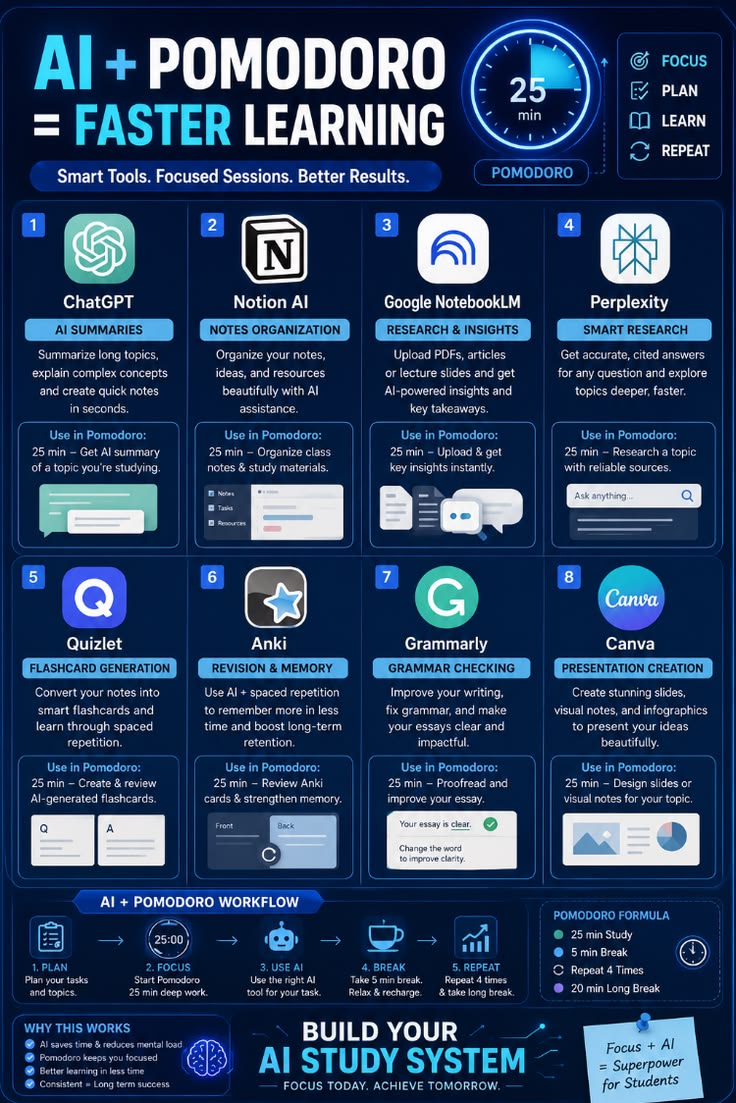
How to Build Your AI Study System for Faster Learning
Combining AI tools with the Pomodoro technique gives you a structured system to maximize focus, cut down study time, and boost memory retention.
Here is the exact step-by-step framework to set up your AI-powered study workflow.
The Core Pomodoro Formula
Before diving into the tools, follow this baseline time-block system to structure your study sessions:
25 Minutes: Deep, focused study (no distractions).
5 Minutes: Short break to relax and recharge.
Repeat: Execute 4 consecutive 25-minute Pomodoro blocks.
20 Minutes: Take a long break after completing 4 cycles.
Step-by-Step AI Workflows (25-Minute Study Blocks)
Step 1: Rapid Concept Summarization (ChatGPT)
Goal: Get high-level overviews of complex topics quickly.
How to use in a 25-min Pomodoro: Prompt ChatGPT to summarize long textbook chapters, explain difficult concepts in simple terms, or generate bullet points of key topics you are studying.
Step 2: Smart Notes Organization (Notion AI)
Goal: Structure scattered thoughts and study materials cleanly.
How to use in a 25-min Pomodoro: Use Notion AI to categorize class notes, organize syllabus resources, convert rough scribbles into clear tables, and track your study tasks.
Step 3: Deep Research & Document Synthesis (Google NotebookLM)
Goal: Extract key insights directly from your uploaded materials.
How to use in a 25-min Pomodoro: Upload lecture PDFs, research papers, or slides to NotebookLM to instantly generate summaries, Q&A sheets, and key takeaways grounded in your specific documents.
Step 4: Accurate Fact-Finding & Sourced Research (Perplexity)
Goal: Get accurate, cited answers with deep topic exploration.
How to use in a 25-min Pomodoro: Search complex questions on Perplexity to get up-to-date answers with clear citations and sources to dive deeper without digging through ad-heavy search results.
Step 5: Instant Flashcard Generation (Quizlet)
Goal: Convert raw notes into active recall practice sets.
How to use in a 25-min Pomodoro: Feed your study notes into Quizlet to automatically generate flashcards and test yourself using built-in study modes.
Step 6: Spaced Repetition & Memory Retention (Anki)
Goal: Boost long-term recall and prevent memory decay.
How to use in a 25-min Pomodoro: Review your AI-generated or custom Anki card decks using its spaced repetition algorithm to strengthen long-term memory.
Step 7: Proofreading & Refinement (Grammarly)
Goal: Improve tone, clarity, and grammatical precision.
How to use in a 25-min Pomodoro: Paste your essays, reports, or short answers into Grammarly to fix grammatical errors, enhance sentence flow, and polish your writing tone.
Step 8: Visual Summaries & Presentation Design (Canva)
Goal: Turn written concepts into engaging visual summaries or slides.
How to use in a 25-min Pomodoro: Use Canva’s AI tools to quickly generate presentations, mind maps, infographics, or visual cheat sheets for your study topics.
The Complete AI + Pomodoro Workflow
Plan: Spend 2–3 minutes deciding on the specific task and selecting the right AI tool.
Focus: Set a 25-minute timer and eliminate all notifications.
Use AI: Leverage the selected AI tool to complete the task efficiently during the block.
Break: Take a 5-minute break to rest your eyes and step away from the screen.
Repeat: Complete 4 full rounds, then reward yourself with a 20-minute long break.
Why This System Works
Saves Time & Mental Load: AI handles repetitive tasks like summarizing, organizing, and card creation.
Maintains High Focus: The 25-minute boundary prevents burnout and keeps fatigue at bay.
Drives Long-Term Success: Combines active recall and structured breaks for maximum retention.